Integrating the Gripper and Robot model within Moveit2 – Part 1: Merging the URDF
Overview
In this tutorial, we cover the first step of integrating a gripper with your cobot by merging the robot and gripper models into a single URDF/Xacro file. This unified description is required before generating the MoveIt2 configuration package.
Requirements
Before starting, make sure you have the following installed:
1) Ubuntu 22.04.5 LTS
2) ROS 2 Humble
3) Fairino Moveit2 plugin
To include the gripper in your MoveIt2 setup, the process mainly consists of three steps:
1. Create a unified robot description file (URDF) that combines both the robot and the gripper.
2. Generate a MoveIt2 configuration package, either manually or using the MoveIt2 Setup Assistant.
3. Configure the MoveIt2 package for integration with the FR collaborative robot.
This article covers the first step of generating the merged URDF file.
Creating the URDF for the Gripper & Cobot
Create the Workspace
Before starting this tutorial, create a new workspace named frg_gripp_int_ws, as shown in the screenshot below.
This workspace will contain the integrated URDF, along with the mesh files for both the gripper and the cobot.

cd ~/path/to/fairino/plugin
# Make frg_gripp_int_ws directory and src subfolder
mkdir -p frg_gripp_int_ws/src
Clone the Gripper Repository
We recommend contacting the gripper manufacturer to obtain the required URDF and mesh files.
In this tutorial, we will use the AG Gripper from DH Robotics.
cd frg_gripp_int_ws/src
After cloning the repository, copy the required folder directly into the 'src' directory as shown in the screenshot below.
# copy description files from the inside the ros2 folder
cp -r dh_ag95_gripper_ros2/dh_ag95_description .
You can then delete the remaining files from 'dh_ag95_gripper_ros2', since they will not be needed for this tutorial.
rm -rf dh_ag95_gripper_ros2
Copy the Description Package from the Fairino Plugin
cp -r ~/ros-plugins/frcobot_ros2/fairino_description .
This command copies the fairino_description package from the Fairino ROS2 plugin workspace into your current 'src' directory.
Create the Integration package structure
Create the integration structure using the following commands:
# ensure you are inside frg_gripp_int_ws
cd frg_gripp_int_ws/src
mkdir -p fairino_gripper_integrated_desc/meshes/{gripper,robot}
mkdir -p fairino_gripper_integrated_desc/urdf
touch fairino_gripper_integrated_desc/package.xml
touch fairino_gripper_integrated_desc/CMakeLists.txt
After running the commands, the directory structure should look like the following:

frg_gripp_int_ws/
└── src/
├── fairino_description/
├── dh_ag95_description/
└── fairino_gripper_integrated_desc/
├── meshes/
│ ├── gripper/
│ └── robot/
├── urdf/
├── package.xml
└── CMakeLists.txt
Copy Mesh Files
Next, copy the required mesh and URDF files into their corresponding folders.
From
/path/to/ros-plugin/frcobot_ros2/fairino_description/meshes/fairino5_v6

This is a reminder to replace 'path/to/...' and 'fairino5_v6' with your actual file path and desired robot model
Copy all STL mesh files into:
frg_gripp_int_ws/src/fairino_gripper_integrated_desc/meshes/robot
Then repeat the same process for the gripper files.
Copy the gripper mesh files from:
/path/to/ros-plugin/frg_gripp_int_ws/src/dh_ag95_description/meshes/visual
to:
/path/to/ros-plugin/frg_gripp_int_ws/src/fairino_gripper_integrated_desc/meshes/gripper
Copy URDF Files
After moving the mesh files you can move the URDF from
/path/to/ros-plugin/frcobot_ros2/fairino_description/urdf
Copy the fairino5_v6.urdf (or other desired robot URDF) file into:
/path/to/ros-plugin/frg_gripp_int_ws/src/fairino_gripper_integrated_desc/urdf
Then repeat the same process for the gripper files by copying the gripper mesh files from:
/path/to/ros-plugin/frg_gripp_int_ws/src/dh_ag95_description/urdf
to:
/path/to/ros-plugin/frg_gripp_int_ws/src/fairino_gripper_integrated_desc/urdf
Integrate the URDFs
Inside the 'urdf' folder, create a new Xacro file:
touch integrated.urdf.xacro
Then open the file and integrate the gripper with the robot’s 'wrist3_link':

<?xml version="1.0"?>
<robot xmlns:xacro="http://www.ros.org/wiki/xacro" name="fairino_with_ag95">
<!-- Fairino robot description urdf, you might need to modify the file name if you use a different robot model -->
<xacro:include filename="$(find fairino_gripper_integrated_desc)/urdf/fairino5_v6.urdf" />
<!-- Gripper macro you might need to modify the file name if you have a different gripper -->
<xacro:include filename="$(find fairino_gripper_integrated_desc)/urdf/dh_ag95_macro.xacro" />
<!-- Attach gripper to wrist link, you might need to change the offset of the gripper if needed -->
<xacro:dh_ag95_gripper parent="wrist3_link" prefix="gripper_">
<origin xyz="0 0 0" rpy="0 0 0" />
</xacro:dh_ag95_gripper>
</robot>
Modify the `CMakeLists.txt` & `package.xml` Files
Update the CMakeLists.txt file with the following content:
cmake_minimum_required(VERSION 3.8)
project(fairino_gripper_integrated_desc)
if(CMAKE_COMPILER_IS_GNUCXX OR CMAKE_CXX_COMPILER_ID MATCHES "Clang")
add_compile_options(-Wall -Wextra -Wpedantic)
endif()
find_package(ament_cmake REQUIRED)
install(DIRECTORY
meshes
urdf
DESTINATION share/${PROJECT_NAME}
)
ament_package()
Update the package.xml file with the following content:
<?xml version="1.0"?>
<?xml-model href="http://download.ros.org/schema/package_format3.xsd" schematypens="http://www.w3.org/2001/XMLSchema"?>
<package format="3">
<name>fairino_gripper_integrated_desc</name>
<version>0.0.0</version>
<description>
URDF description package for the Fairino integrated gripper
</description>
<maintainer email="user@todo.todo">user</maintainer>
<license>Apache-2.0</license>
<buildtool_depend>ament_cmake</buildtool_depend>
<exec_depend>urdf</exec_depend>
<exec_depend>xacro</exec_depend>
<export>
<build_type>ament_cmake</build_type>
</export>
</package>
Test the URDF
You can then visualize the setup by using the following command after building:
colcon build
source install/setup.bash
ros2 launch urdf_tutorial display.launch.py model:=$(ros2 pkg prefix fairino_gripper_integrated_desc)/share/fairino_gripper_integrated_desc/urdf/integrated.urdf.xacro
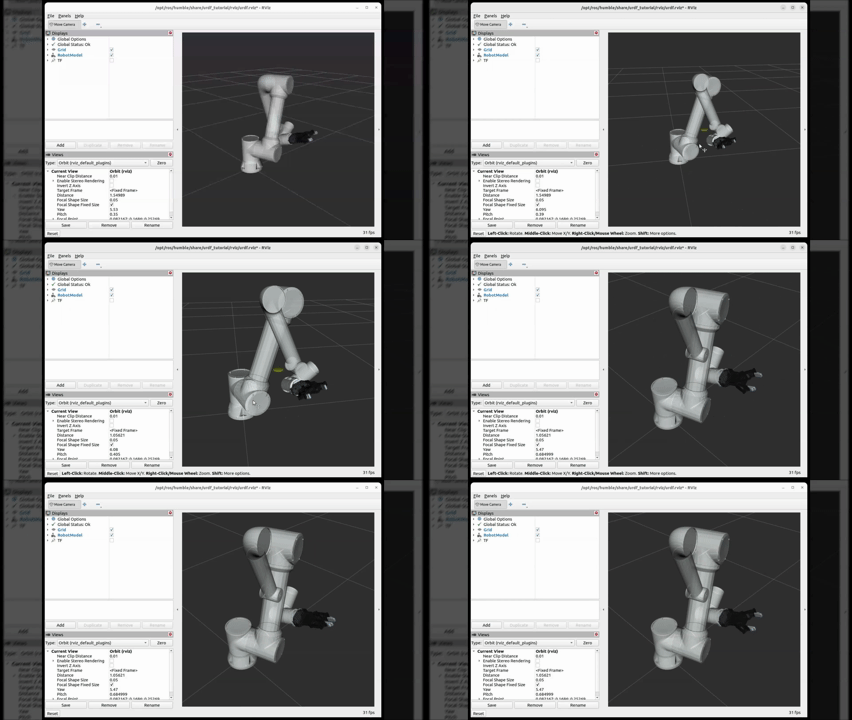
As shown above, the gripper initially appears to collide with the robot body. To correct this, we can modify the 'z' offset value inside the integrated URDF file created earlier.
This adjustment process usually involves some trial and error until the desired alignment is achieved. For example, setting the 'z' value in 'integrated.urdf' to 0.1 results in the following configuration.
After modifying the URDF, make sure to rebuild the workspace and source the installation again.
After applying the modification, the gripper is properly shifted relative to wrist3, as shown below.
Import the Integrated Model into Moveit2
source install/setup.bash
# enforce directX
export QT_QPA_PLATFORM=xcb
ros2 launch moveit_setup_assistant setup_assistant.launch.py
Related Articles
Getting Started with the FAIRINO MoveIt2 Plugin
Overview In this tutorial, we focus on the installation and setup of a basic MoveIt2 environment using the FR5 cobot model. By the end of this tutorial, you should have a basic understanding of MoveIt2, and how to launch a functional planning ...Integrating your FAIRINO cobot with Moveit2
Overview This tutorial focuses on the steps required to integrate your FAIRINO collaborative robot with MoveIt2, enabling advanced motion planning, collision avoidance, and safe robot interaction within complex environments. By following this guide, ...Integrating FAIRINO Cobot with MEGMEET
Overview Integrating a FAIRINO cobot with a MEGMEET welding system requires a robust communication bridge to synchronize robotic motion with critical welding parameters such as voltage, current, and arc ignition. This synchronization is essential to ...Getting Started with the Schmalz Vacuum Gripper
Vacuum grippers are commonly used in pick-and-place and machine tending for parts with flat surfaces and light to medium weight. They enable fast, high-cycle handling (loading/unloading) of items like cartons, sheet metal, and any flat or slightly ...Setting Up a DH Robotics AG Gripper
Setting up your DaHuan (DH) Gripper with the Fairino Robot To set up a DH gripper to communicate through the end of arm port, you will need: - 1 DH Gripper - 1 Fairino Robot - 1 8pin->5pin adapter Step1: Connect the cable from the gripper to the ...